KB Article #3010
You can save time getting to your orders by adding the CollisionLink Shop website as an icon to your Windows Desktop.
There are two methods to creating an icon for CollisionLink Shop on your desktop. Choose the option below that is convenient for you:
- Using your Internet browser to create a CollisionLink Shop icon on your desktop.
- Adding an icon to CollisionLink Shop from your Windows desktop.
Option 1: Using Your Browser to Create an Icon on Your Desktop
To create a desktop icon in Microsoft Edge, Google Chrome, or Mozilla Firefox:
- View the CollisionLinkShop.com login page.
- If your browser is maximized (full-screen mode), click
 in the upper right-hand corner to reduce its size.
 - Click the padlock icon to the left of the CollisionLink Shop URL in the address bar and hold down the mouse button. While holding down the mouse button, drag the padlock icon to any place on your Windows Desktop.
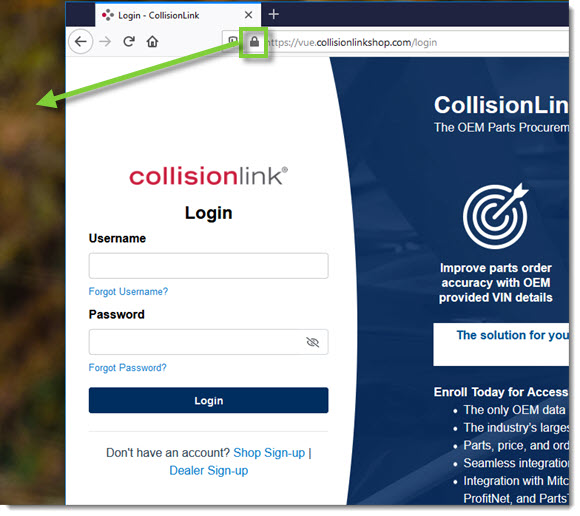
- A Login - CollisionLink icon will be added to your desktop.

- To rename the icon (for example, to CollisionLink Shop), right-click on the icon and click Rename.
Simply double-click the icon any time you want to open CollisionLink Shop and you will be taken directly to the login page.
Option 2: Using Your Windows Desktop to Create an Icon
This process is the same for Microsoft Edge, Google Chrome, and Mozilla Firefox.
- Right-click anywhere on your desktop. When the menu displays, click New, then Shortcut.
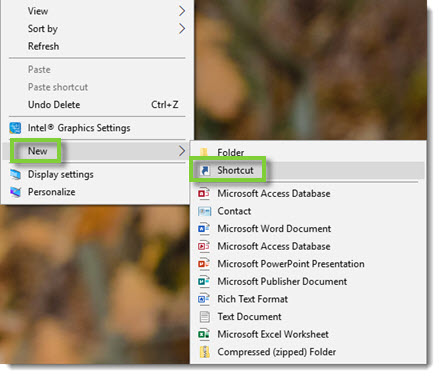
- Type or copy www.CollisionLinkShop.com into the provided field.
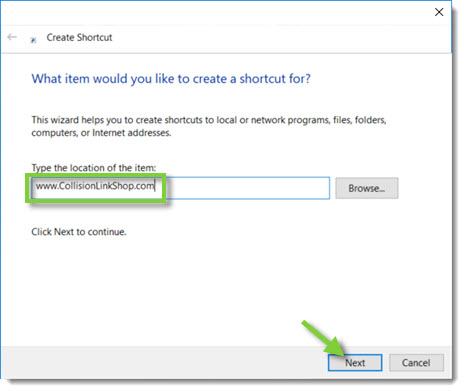
- Click Next to proceed.
- Type a convenient name for the shortcut (for example, CollisionLink Shop) in the provided field.
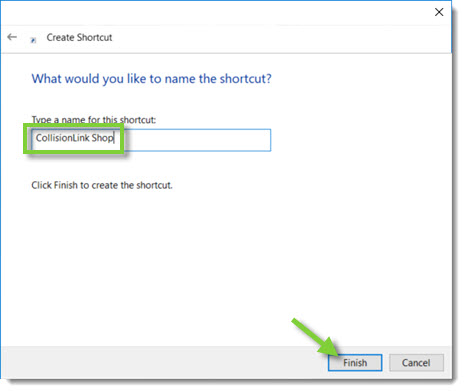
- When ready, click Finish.
- An icon with the name you chose will be added to your desktop. Note: The icon will show the logo of whichever browser is the default on your computer (Microsoft Edge, Google Chrome, or Mozilla Firefox).

Simply double-click the icon any time you want to open CollisionLink Shop and you will be taken directly to the login page.