KB Article #6967
If a part is not already on the unsent order, you can add it using the Add Part option or through the OEM catalog. This is common if specific bolts or screws are needed to perform the repair but were not originally included in the order.
Adding Parts Using the Add Part Option
To add an additional part to an unsent order using the Add Part option:
- Within the unsent order, click Add Part.

- A new line item will appear at the bottom of the list of parts. Enter the part number in the first field.

- Choose appropriately from the Type drop-down menu.

- Type a description of the part in the next field.

- Enter the quantity required for the order.

- Fill in the part's estimated price in the next field.

- The next five fields will default to N/A or Contact Dealer.
- Choose appropriately from the Request drop-down menu.

Note: To remove the newly added part, click the trash can icon ( ) to the right of the line item.
Adding Parts Using the OEM Catalog
To add an additional part to an unsent order using the OEM catalog:
- Open the OEM catalog by clicking the
 icon from any part line in your unsent order.
 - Compare the parts list for the order on the left to the parts shown on the illustration. Each part has an associated callout number in the illustration. Click on the different parts to locate them on the illustration.

- If parts are missing, click the callout to display its details in the Parts List table on the right.
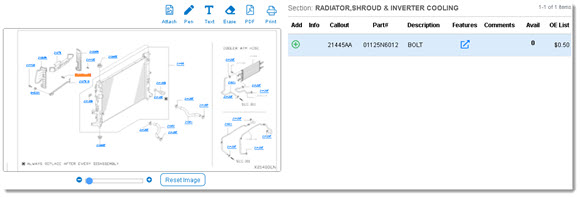
- If a part is not included in the order, a green plus icon will appear in the Add column.

- If the part is already in the order, this space will appear blank.
- Click the
 icon to add the part to the order.
 - A success message will appear above the illustration once added.

- The part will then appear in two places as part of the order:
- At the bottom of the left side panel, highlighted in blue.

- At the bottom of the unsent order list.

- At the bottom of the left side panel, highlighted in blue.
Note: To remove the newly added part, click the trash can icon () to the right of the line item.