KB Article #2789
Manual Import is an optional feature that allows you and your users to choose the specific estimates they want to import and create an order for in CollisionLink. If you choose not to enable this feature, you cannot be selective--estimates sent by any of your users will automatically generate an order in CollisionLink. (Do not use this process if your estimates have stopped importing! Click here to resolve importing issues.)
Notes:
- If you are using Crash-writeR or Web-Est to generate your estimates, the Manual Import feature must be enabled (see below).
- If you use more than one estimating system, selecting the Enable Manual Import option will impact the import functionality of all estimating systems. All users will have to import their estimates manually when the option is enabled.
To enable the manual import option:
- Click the Account Management menu option.

- It should default to the Company Information tab.
- Check the Enable Manual Import box.

- Click Save.
- The Import Estimate button will now display on the Unsent Orders List.

To manually import estimates into CollisionLink:
- From the Unsent Orders List, click Import Estimate.

- The Import Estimates window will display.
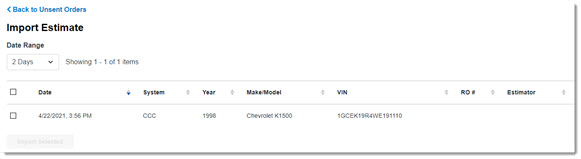
- By default, the Import Estimate List displays items imported in the last two days. If you need to view older estimates, choose a Date Range from the drop-down menu.

Options include:- Display All
- Today Only
- 2 Days
- 5 Days
- 10 Days
- By default, the Import Estimate List displays items imported in the last two days. If you need to view older estimates, choose a Date Range from the drop-down menu.
- Check the boxes next to the estimates you wish to import, then click Import Selected.
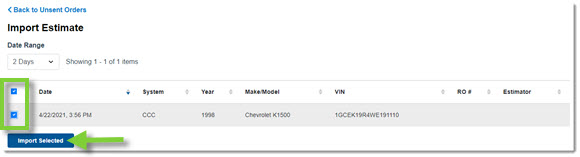
- Click Back to Unsent Orders to access and submit the estimates you selected as orders to your dealer. Note: Revised estimates imported for orders you have already sent will update your order on the Open Jobs List.
